
Mercedes W204 Head Unit Upgrade (Benefits and How to Install)
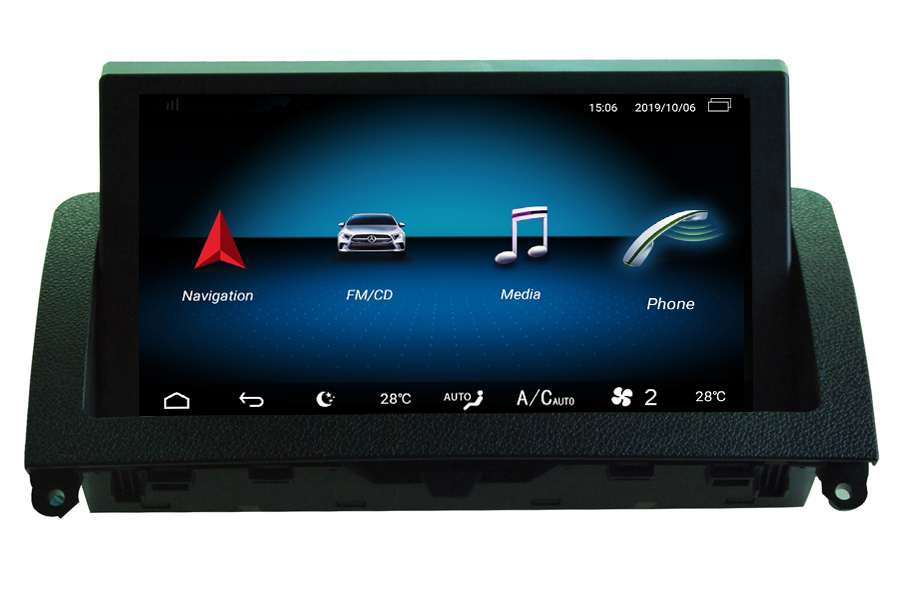
Mercedes C-Class W204 head unit upgrade is available now. Upgrading the head unit in your Mercedes W204 can provide a wide range of benefits, including Apple carplay, Android auto, GPS navigation system, rear view camera display, advanced connectivity options, greater compatibility. These benefits can help enhance the overall user experience of your car’s infotainment system, making your daily commute more enjoyable and productive.
In this post, we will introduce you the benefits of Mercedes w204 head unit upgrade, and how to install it with a step-by-step guid

Contents
- Benefits of Mercedes W204 Head Unit Upgrade
- W204 Head Unit Upgrade Installation Step by Step
- Trouble Shooting While Installing
Benefits of Mercedes W204 Head Unit Upgrade
Upgrading the head unit in your Mercedes W204 can provide you many benefits, including:
-
Apple carplay and Android auto
upgrading the Mercedes w204 head unit with Apple CarPlay can provide access to advanced navigation features, seamless integration with Siri and other Apple devices, third-party app integration, and a simple, easy-to-use interface that is optimized for use while driving. These benefits can help make your driving experience safer, more enjoyable, and more productive.
-
Integration with Factory Controls
The aftermarket Mercedes w204 head unit upgrade is designed to work seamlessly with your car’s factory functions and controls. This means you can control your upgraded head unit using your car’s steering wheel controls, and the new head unit will display original information on the new HD touch screen.
-
Advanced Connectivity Options
Upgrading the w204 head unit can give you more connectivity options, such as Bluetooth connectivity, USB ports, and auxiliary inputs. This makes it easier to play music from your phone or other devices.
-
Compatibility with modern technology
A w204 head unit upgrade can make your car more compatible with modern technology. This is because newer head unit is designed to work with the latest technology and software updates, allowing you to take full advantage of features like smartphone integration, advanced voice control, and hands-free calling.
-
Enhanced Navigation Features
The w204 head unit upgrade comes with advanced navigation features that can make it easier to get around. Features like 3D maps, real-time traffic updates, and voice-guided navigation can improve your driving experience.
-
Improved Safety
An aftermarket head unit comes with advanced safety features, such as rearview camera, parking sensors, and collision warning systems. These features can help you stay aware of your surroundings and avoid accidents while driving.
In conclusion, upgrading the head unit in your Mercedes W204 can provide you with many benefits so it’s worth doing a upgrade.
Where to buy it?
If your Mercedes W204 comes with an original 5.8 inch small screen or 7 inch large screen, and with a working aux function, you can order and install this unit in your car.

Buy it Online: https://www.sigmacarstereo.com/mercedes-benz-c-class-w204-android-aftermarket-headunit-dab-radio-upgrade-carplay
Inbuilt with a 8″ OEM looking or a larger 10 inch HD touch screen, wireless Apple carplay and Android auto, GPS navigation system, Bluetooth phone calling, Bluetooth streaming music with your phone, USB. It also supports steering wheel controls and a backup camera with a RCA connector.
W204 Head Unit Upgrade Installation Step by Step
Before beginning the installation process, it is important to gather all of the necessary tools and materials.
Some of the tools that you may need include a panel removal tool, wire strippers, and a screwdriver. You will also need a new head unit that is compatible with your Mercedes W204.
Before starting the installation process, you must take out car key and the best to disconnect the car battery. This is a critical step that will ensure your safety and the safety of your car’s electrical system.
The first step is removing the factory Mercedes W204 screen unit and radio system, then you can connect all cables and install new touch screen W204 head unit in your car.
- User a special installation tool to remove the central air vents.


- Unplug the cables behind the air vents, then you can take out the air vent.

- Remove 4 screws to take out the screen unit and radio/cd system.

- Take out the w204 factory screen unit, unplug cables behind.

- Take out the w204 oem radio and cd system, unplug cables behind.

- So factory w204 screen and radio have been removed and the next step is to install the new W204 screen unit.
Upgraded in 2022: You just need to connect less plugs now, see below photos:

- You will need to connect the white LVDS plug behind the new android screen(right plug as above) with your w204’s LVDS plug which was disconnected from the back of your factory screen.

- There are 2 square big plugs to connect your CD and factory wiring harness, see below picture:

Important! If there are fiber optic cables from factory wiring harness, you need to move them to our new plug at the same position as below:


- Where to put the main unit control box?
You can put the main unit box in the glove box as below.

Of course you can also put the control box to other places if you can.
- This step is only necessary for camera installation.Want to connect an aftermarket backup camera with this w204 android GPS unit? That’s easy to do that. Check a black cable with yellow RCA connector and BACK-VIDEO-IN label on it which connects to the video cable from the backup camera, see below pic:

And there’s trigger line which should connect 12V+ reverse light, see below pic:

Besides, you should get the power for the camera with 12V reverse light(not from our 12V power), so after you put in reverse gear, the camera can get power and automatically display rear view images on screen.
In conclusion, installing a w204 head unit upgrade is a straightforward process that can be completed with a few basic tools and some patience. By following these steps carefully, you can enjoy a better driving experience with your new head unit.
Trouble Shooting While Installing W204 Head Unit Upgrade
- Rear camera no signal, or rear image is flicking – If you have connected the camera correctly (check the above step for the camera again), but still no signal or the display is not stable, that’s because the voltage from your car reverse light is not stable, we have a solution, you can connect a relay to power the camera. A professional mechanic should know how to connect the relay for the camera easily. Here’s a document with clear photos for you to check how to connect the camera for Mercedes W204 and how to connect a relay, you can download it here
- No sound from android music playing after installation – If there’s no sound after installation from Android music or video playing, but have sound from your radio and CD, you need to enter into factory menu to .If still no sound after you have already activated the factory aux mode(this rarely happens with only 1% possibilities according to our experience before), then you will need to check the factory aux wires from the plug behind the CD, and compare them with our aux wires(red, white and black wires in a group) from our new plug, make sure they are matched, if not, then you can move the factory aux wires to match the position of our new aux wires, or you can connect the factory aux wires directly with our aux wires, this is the first solution.The second solution is by using a aux-adapter audio cable from us to connect our main unit and your 3.5 mm aux port directly in the glove box to get the factory aux working. You can check this cable as below:

Note: this cable is not included in the package by default, because only very few cars need it.
- No sound from factory radio or CD – If there’s no sound from car radio or CD playing, you need to check the fiber optic cable plug which connected to our new plug as below:

Solution: Please turn off your car and the unit, then you can disconnect the entire square plug from your CD, then re-connect the fiber optic plug with our CD plug, make sure it’s well connected. We had one customer the first time installed but there’s no sound from radio, after he checked and re-connected the fiber optic plug the sound issue solved. After installation, if you want to listen to radio and navigation sound at the same time, you can try these steps: When the unit displays original radio interface, long press the voice button from your steering wheel controls, then the screen will automatically switch to our GPS function, so that the GPS sound will come out from small speaker, and radio sound comes out from car speakers.
- Switch between Mercedes menu and Android menu: Switch from factory menu to new Android menu: just activate and enter into factory Aux mode, the screen will switch to new menu automatically. For new version, you can touch the screen to switch from old menu to android menu, click FM/CD icon to switch from android menu to old menu.After installation if your old factory OEM menus does not display normally, don’t worry, you can contact us we will tell you how to set it correct in settings. Because there are 2 different OEM screens from Mercedes-Benz W204, one is with factory small 5″ screen, the other is with factory large 7″ screen, the screen resolution is different.
If you still have a question while installing, please take some photos for us to check all cables and plugs connections and send to us via email info@sigmacarstereo.com our technicians would be glad to assist you.
You can also contact us on Facebook:
https://www.facebook.com/sigmacarstereo
or send a message to our whatsapp:
https://api.whatsapp.com/send/?phone=00447591940624
By following our facebook page, You can get latest news of our products including new arrivals, installation instructions, product videos, etc. And you can send a message on our facebook page.
posted in Mercedes-Benz
Tagged mercedes w204, head unit upgrade,
Leave a Comment